

Shipping takes place within 3-5 business days. If there is a problem with the shipment of the product, we will notify you via the email address you entered when ordering.
HYRTA
USB C Docking Station,12 in 1 Displaylink USB 3.0 to USB-C Dock Dual Monitor with HDMI,VGA,USB A 3.0,PD3.0, Laptop Docking Station for MacBook Pro&Air/M1/M2/M3/HP and More USB Ports Laptops
Couldn't load pickup availability
About This
- Wide compatibility: universal docking station work with most of USB 3.0 devices.Works on Mac OS X 10.6 or higher; Windows XP, 7 or higher; Ubuntu ;Chrome OS;Android system.USB C hub is equipped with the latest generation of super-smart chips(DisplayLink), breaks the single stream limitation of macOS,supports MST (multi-streaming) multiple displays.(Note:Please download the displaylink driver before use and you need to download the latest M1/M2/M3 dedicated driver before use it on your M1/M2 laptop.
- 12 in 1 USB C Laptop Docking Station: HYRTA USB 3.0 docking station equipped with USB-C OTG converter.perfectly combined the function of usb-c hub,suitable for all the usb 3.0 or usb c laptop;you can easily extending one USB Type C port or USB A port to 2 HDMI, VGA, Gigabit Ethernet, 3 USB 3.0, 1USB 2.0 ports, USB C Power Charging Port (max 100W),SD/Micro SD card readers and 3.5mm Mic/audio.
- Triple Display Docking Station :The displaylink USB C hub supports dual monitor or triple display for Mac OS & windows system laptops.with 2*HDMI( up to 2048*1152@60HZ ) , 1*VGA ( up to 1920*1080@60HZ ) port from your laptop when single use. When two HDMI are used simultaneously, the resolution is up to 2048*1152@60HZ, when used with VGA, (whether two HDMI or a single HDMI and VGA are connected simultaneously) the resolution is up to 1920*1080@60HZ.
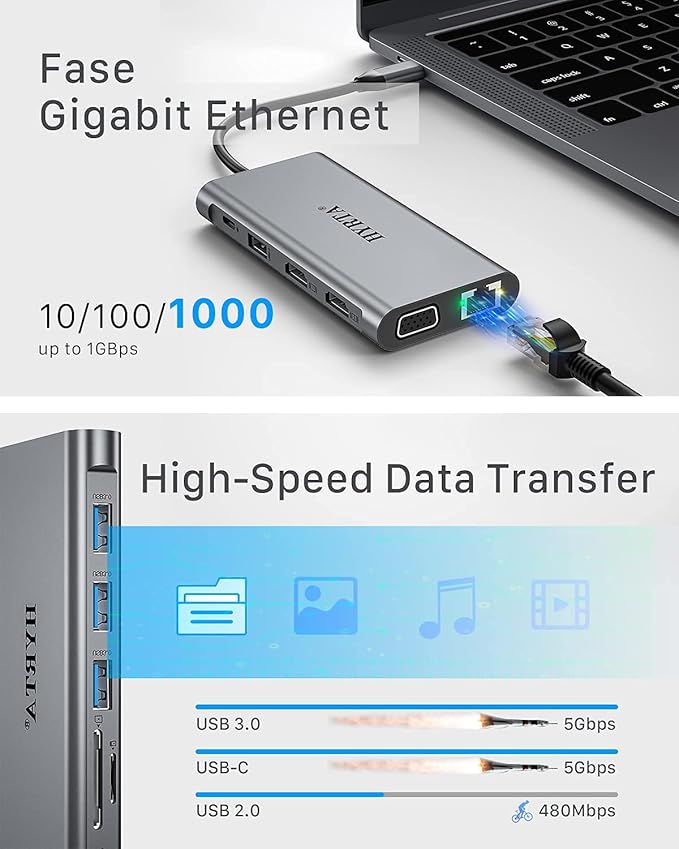
- Super Speed Data Transfer: The displaylink USB C dock Stably access the Internet with 10/100/1000M Ethernet port.3*USB 3.0 ports up to 5Gbps, perfect for your hard drive and other wire device(Note:please supply power for the usb 3.0 dock by usb-c pd charging port when connect with high-power external device to ensure the usb hub work nornally).SD/TF card slots for superior data-storing versatility. 3.5mm headphone and microphone jacks,brings clear audio sync.(Note: The audio only valid for HDMI2).
- Multi-functional USB C HUB: USB C docking station equipped with USB-C OTG converter,efficient expand desktop space, suitable for all the laptop and Desktop PC with USB-A or USB-C port; Ideal device for everyday carry, commute, travel.
- Compatible for M1/M2/M3 MacBook :HYRTA laptop docking station has more powerful and stable with the ports of connectivity, supports triple Monitors for MacOS and Windows, and dual monitor non-mirror expended. You can expand your laptop's desktop to dual or triple displays at once to increase work and study productivity, make you start a more intelligent life.
Overview
- Brand : HYRTA
- Color : Grey
- Hardware Interface : USB
- Special Feature : Install the official DisplayLink driver in your laptop before use, the HDMI1, HDMI2, and VGA must need the latest DisplayLink driver to work. Install the official DisplayLink driver in your laptop before use, the HDMI1, HDMI2, and VGA must need the latest DisplayLink driver to work.
- Compatible Devices : MacBook air&Pro M1,M2,Macbook mini iPad Pro (2018-2021),ChromeBook, Dell XPS 13/15, Lenovo Yoga, Huawei Matebook, ASUS ZenBook, Samsung Galaxy S9/S9+. Works on Mac OS X 10.6 or higher; Windows XP, 7 or higher; Ubuntu ;Chrome OS;Android system MacBook air&Pro M1,M2,Macbook mini iPad Pro (2018-2021),ChromeBook, Dell XPS 13/15, Lenovo Yoga, Huawei Matebook, ASUS ZenBook, Samsung Galaxy S9/S9+. Wor… See more
Share

Collections
-
Back to School & Study Essentials
Equip students and lifelong learners with stationery, planners, notebooks, and study accessories...
-
Cable Management & Tech Setup
Tame the cables — clips, sleeves, boxes, and organizers that keep cords...
-
Creative & Relax Zone
Balance work with creativity and calm — art supplies, DIY kits, puzzles,...
DeskDen Supplies – Your Everyday Office Essential
Whether you’re working from home, managing a busy office, or studying for success, DeskDen products deliver quality you can rely on.
-
Desk Essentials
Equip your desk with everyday tools — pens, notebooks, planners, folders, and...
-
Digital Accessories
Power your digital setup with keyboards, mice, cables, and chargers designed to...
-
Eco-Friendly Office
Work smarter and greener with recycled stationery, sustainable materials, and eco-conscious office...
-
Home Office Essentials
Create a comfortable, efficient home office with ergonomic accessories, organization tools, and...

Affordable essentials for work, school, or home office
From sturdy notebooks and smooth-glide pens to file organizers and desk accessories, every item is crafted to keep your desk neat and your workflow seamless.
Blog posts
View all-
Desk Organization Tips for a Clutter-Free Works...
Practical desk organization tips to help you maintain a clutter-free workspace, improving focus and workflow through intentional storage, layout planning, and smart tools.
Desk Organization Tips for a Clutter-Free Works...
Practical desk organization tips to help you maintain a clutter-free workspace, improving focus and workflow through intentional storage, layout planning, and smart tools.
-
How to Design a Productive Home Office Setup
A comprehensive guide to creating a productive home office, focusing on ergonomic layouts, organization strategies, and must-have desk accessories for enhanced focus and comfort.
How to Design a Productive Home Office Setup
A comprehensive guide to creating a productive home office, focusing on ergonomic layouts, organization strategies, and must-have desk accessories for enhanced focus and comfort.
-
Ergonomic Office Essentials: How to Design a He...
A detailed ergonomic guide explaining how to configure your desk and accessories for posture support, reduced strain, and sustained comfort—focusing on chairs, monitor placement, keyboard positioning, and supportive tools.
Ergonomic Office Essentials: How to Design a He...
A detailed ergonomic guide explaining how to configure your desk and accessories for posture support, reduced strain, and sustained comfort—focusing on chairs, monitor placement, keyboard positioning, and supportive tools.