

Shipping takes place within 3-5 business days. If there is a problem with the shipment of the product, we will notify you via the email address you entered when ordering.
ACASIS
USB C Hub Docking Station Dual Monitor 2 HDMI 4K@60HZ,14 in 1 Laptop Docking Station 3 Monitor with 10Gbps(USB-c Video+Data,3*USB C,USB A) Ethernet,PD 100W,SD/TF,3.5mm Audio for Dell/HP/Lenovo
Couldn't load pickup availability
About This
- [14-in-1 USB C Docking Station for Laptop] ACASIS USB C Docking Station Dual Monitor easily expands your laptop from a single USB C/thunderbolt 3/4/type C port to a 14-port mobile workstation, USB C Docking Station 3 Monitor with 2x*HDMI 4K@60+4K USB C, 3*10Gbps USB C 3.1, 10Gbps USB A 3.1, 2xUSB 2.0, SD/TF card reader, 1Gbps Ethernet,3.5mm audio and microphone, and PD 100W charging, as well as a full-featured USB C video port.
- [10Gbps full-featured USB C port]This Laptop USB C Dock is designed with a 10Gbps full-featured USB C port, which not only transfers data at 10GBps, but also supports DP alt mode.So Notebook USB C ports must support DP ALT mode or THUNDERBOLT.This laptop dock can expand 3 monitors with 2 HDMI + USB C Vedio ports. WINDOWS Laptop Support Mirror mode and Extend mode(Display three different screens simultaneously).This USBC hub is the perfectfor USB C monitor!Note: MacOS MST unsupported!!!
- [Up to 10Gbps Data Transfer] The Dual Portable Display Docking Station comes with 3*USB 3.1-C and USB 3.1-A ports (up to 10Gbp/s). The remaining 2 USB 2.0 ports are suitable for mouse, keyboard and other low-speed devices. The remaining 2 USB 2.0 ports are suitable for mice, keyboards and other low-speed devices.
- [Gigabit Ethernet]The USB C Docking Station Dual Portable Monitor features a high-speed Gigabit Ethernet port that ensures a stable and smooth network connection; it provides perfect standby for laptops without Ethernet outlets when wireless networking fails, so you can work remotely, conduct online meetings, and have everything under control.The RJ45 port recognizes your network speed and automatically adjusts to the highest level, regardless of whether it is 10/100/1000Mbps .
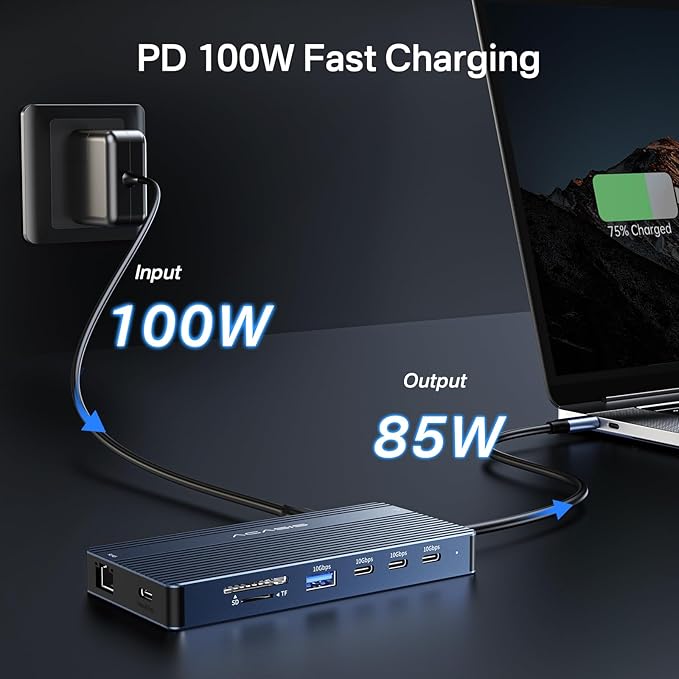
- [ PD100W Charging]ACASIS Multi-Port USB C Adapter supports 100W input power; for safety, the output power (charging) is limited to 85W.Please connect a power source of 65W or higher to ensure sufficient power for operation.Type C PD Charging Port is only available for devices with PD protocol.This docking station is for Windows systems and is compatible with Thunderbolt 3 or USB c port devices.
Overview
- Brand : ACASIS
- Color : Grey
- Hardware Interface : HDMI
- Compatible Devices : Dell
- Total USB Ports : 7
- Product Dimensions : 1.2"L x 3.2"W x 0.7"H
- Number of Ports : 14
- Total HDMI Ports : 2
- Wattage : 100 watts
- Manufacturer : ACASIS
Share

Collections
-
Back to School & Study Essentials
Equip students and lifelong learners with stationery, planners, notebooks, and study accessories...
-
Cable Management & Tech Setup
Tame the cables — clips, sleeves, boxes, and organizers that keep cords...
-
Creative & Relax Zone
Balance work with creativity and calm — art supplies, DIY kits, puzzles,...
DeskDen Supplies – Your Everyday Office Essential
Whether you’re working from home, managing a busy office, or studying for success, DeskDen products deliver quality you can rely on.
-
Desk Essentials
Equip your desk with everyday tools — pens, notebooks, planners, folders, and...
-
Digital Accessories
Power your digital setup with keyboards, mice, cables, and chargers designed to...
-
Eco-Friendly Office
Work smarter and greener with recycled stationery, sustainable materials, and eco-conscious office...
-
Home Office Essentials
Create a comfortable, efficient home office with ergonomic accessories, organization tools, and...

Affordable essentials for work, school, or home office
From sturdy notebooks and smooth-glide pens to file organizers and desk accessories, every item is crafted to keep your desk neat and your workflow seamless.
Blog posts
View all-
Desk Organization Tips for a Clutter-Free Works...
Practical desk organization tips to help you maintain a clutter-free workspace, improving focus and workflow through intentional storage, layout planning, and smart tools.
Desk Organization Tips for a Clutter-Free Works...
Practical desk organization tips to help you maintain a clutter-free workspace, improving focus and workflow through intentional storage, layout planning, and smart tools.
-
How to Design a Productive Home Office Setup
A comprehensive guide to creating a productive home office, focusing on ergonomic layouts, organization strategies, and must-have desk accessories for enhanced focus and comfort.
How to Design a Productive Home Office Setup
A comprehensive guide to creating a productive home office, focusing on ergonomic layouts, organization strategies, and must-have desk accessories for enhanced focus and comfort.
-
Ergonomic Office Essentials: How to Design a He...
A detailed ergonomic guide explaining how to configure your desk and accessories for posture support, reduced strain, and sustained comfort—focusing on chairs, monitor placement, keyboard positioning, and supportive tools.
Ergonomic Office Essentials: How to Design a He...
A detailed ergonomic guide explaining how to configure your desk and accessories for posture support, reduced strain, and sustained comfort—focusing on chairs, monitor placement, keyboard positioning, and supportive tools.